
Fix RGB vs BGR and Normalization Mismatch Between Training and Inference in Computer Vision
Environment
- OS Linux
- Stack Computer Vision · PyTorch · OpenCV · Deep Learning
- Version Version-specific
- Arch Multi-arch
Verification
Procedure verified on by Leo.
Model looks fine in training but fails in production? Fix RGB/BGR channel order and mean/std normalization mismatches between PyTorch, OpenCV, and torchvision preprocessing.
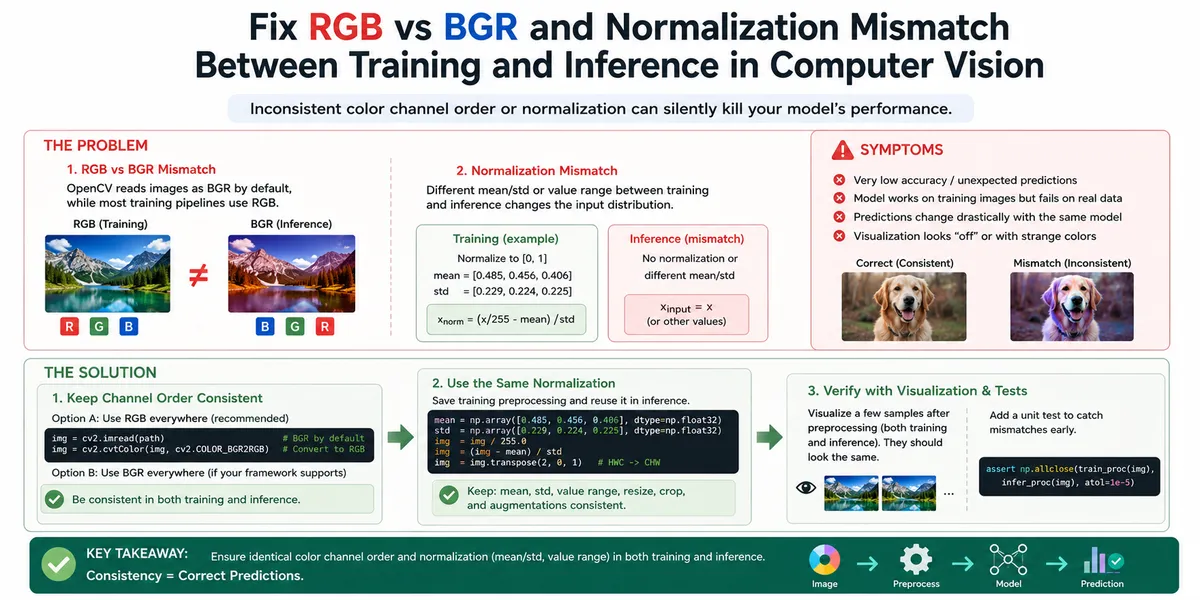
Fix RGB vs BGR and Normalization Mismatch Between Training and Inference in Computer Vision
Your model hits high accuracy on the validation set, but deployed inference returns wrong classes, shifted bounding boxes, or near-random scores. No crash, no obvious stack trace — just silently bad predictions.
Two preprocessing mismatches cause most of these cases:
- Channel order — training used RGB tensors while inference loads BGR images (or the reverse).
- Normalization — training applied one scale or mean/std recipe; inference uses another.
This guide covers how to spot both problems, align training and inference pipelines in PyTorch, OpenCV, and torchvision, and prevent them from coming back.
The short answer: use the exact same preprocessing code path at inference that you used during training, and verify channel order before any normalization.
When this shows up
You are likely dealing with a preprocessing mismatch if:
- Validation accuracy is good, but a standalone inference script performs badly on the same images
- Predictions change when you swap
cv2.imreadforPIL.Image.open(or vice versa) - A demo notebook works, but the C++/ONNX/TensorRT deployment does not
- Object detectors return boxes offset or class labels that look permuted
- Segmentation masks have a consistent color tint or channel swap artifact
Common stacks where this appears:
- PyTorch + torchvision transforms during training, OpenCV
cv2.imreadat inference - Ultralytics YOLO, Detectron2, or custom CNNs exported to ONNX
- Fine-tuning ImageNet pretrained backbones (
ResNet,EfficientNet,ViT) - Edge deployment with OpenCV DNN, TensorRT, or mobile runtimes that expect NCHW float tensors
Why RGB and BGR get swapped
Digital images store three color channels. The order those channels appear in a NumPy array or tensor matters because convolutional filters learned channel-specific weights.
| Library / API | Default channel order on read |
|---|---|
OpenCV cv2.imread | BGR |
Pillow Image.open | RGB |
torchvision read_image | RGB |
TensorFlow tf.io.decode_image | RGB |
Training code often looks like this:
from torchvision.datasets import ImageFolder
from torchvision import transforms

transform = transforms.Compose([
    transforms.Resize((224, 224)),
    transforms.ToTensor(),          # PIL RGB → float tensor, scales to [0, 1]
    transforms.Normalize(
        mean=[0.485, 0.456, 0.406],
        std=[0.229, 0.224, 0.225],
    ),
])
ImageFolder and ToTensor() assume RGB. If inference later does:
import cv2

img = cv2.imread("test.jpg")  # BGR uint8, shape (H, W, 3)
tensor = torch.from_numpy(img).permute(2, 0, 1).float() / 255.0
the red and blue channels are swapped relative to training. The model still runs — PyTorch will not throw an error — but every filter that learned “red-edge” vs “blue-sky” cues now sees the wrong input.
This is the part that often surprises people: swapping R and B rarely crashes the pipeline. Outputs just look plausible enough that you blame the model weights first.
Quick check for channel order
Load one training image through both paths and compare channel means:
import cv2
from PIL import Image
import numpy as np

path = "sample.jpg"

bgr = cv2.imread(path)
rgb_cv = cv2.cvtColor(bgr, cv2.COLOR_BGR2RGB)
rgb_pil = np.array(Image.open(path))

print("BGR  R,G,B means:", bgr[:,:,::-1].mean(axis=(0,1)))   # reorder for display
print("PIL  R,G,B means:", rgb_pil.mean(axis=(0,1)))
print("cvt  R,G,B means:", rgb_cv.mean(axis=(0,1)))
If cv2.imread data is fed directly where PIL RGB was expected, the first channel mean will track blue content instead of red.
Fix the RGB/BGR mismatch
Pick one channel order for the entire project — almost always RGB when using PyTorch/torchvision — and convert at the inference boundary.
Option A — convert OpenCV reads to RGB (recommended):
import cv2
import torch
from torchvision import transforms

normalize = transforms.Normalize(
    mean=[0.485, 0.456, 0.406],
    std=[0.229, 0.224, 0.225],
)

def preprocess_opencv(path: str) -> torch.Tensor:
    bgr = cv2.imread(path)
    rgb = cv2.cvtColor(bgr, cv2.COLOR_BGR2RGB)
    tensor = torch.from_numpy(rgb).permute(2, 0, 1).float() / 255.0
    return normalize(tensor)
Option B — stay on PIL for parity with training:
from PIL import Image
from torchvision import transforms

infer_transform = transforms.Compose([
    transforms.Resize((224, 224)),
    transforms.ToTensor(),
    transforms.Normalize(
        mean=[0.485, 0.456, 0.406],
        std=[0.229, 0.224, 0.225],
    ),
])

def preprocess_pil(path: str) -> torch.Tensor:
    return infer_transform(Image.open(path).convert("RGB"))
Option C — ONNX / C++ / TensorRT: document channel order in the export script. Many ONNX graphs bake in NCHW RGB float input. If your C++ code reads BGR with OpenCV, insert cv::cvtColor(img, img, cv::COLOR_BGR2RGB) before the blob conversion.
Rule of thumb: one function, shared by train and infer. Do not maintain two similar-looking preprocessors.
Why normalization mismatches happen
After channel order, the second silent killer is different scaling or statistics applied to pixel values.
Typical training normalization for ImageNet-pretrained models:
# torchvision ToTensor: uint8 [0,255] → float [0,1]
# then Normalize: (x - mean) / std per channel
mean = [0.485, 0.456, 0.406]
std  = [0.229, 0.224, 0.225]
Common inference mistakes:
| Mistake | What training did | What inference does |
|---|---|---|
Skip Normalize | (x/255 - mean) / std | x / 255 only |
| Wrong scale | [0, 1] range | x left as [0, 255] float |
| ImageNet stats on custom data | Custom mean/std from dataset | Default ImageNet mean/std at inference |
| Mean/std on wrong channel order | RGB mean/std | Same tensors applied to BGR tensor |
| Double normalization | Normalize once in transform | Manual /255 then Normalize again |
A model trained with Normalize but inferred with raw [0,1] tensors sees inputs roughly in [-2, 2] instead of the expected distribution. Activations saturate or collapse, and softmax outputs flatten.
Verify normalization with a golden tensor
Save the tensor from one training batch, then reproduce it at inference:
# During training debug (run once)
torch.save(train_batch[0][0], "golden_input.pt")

# At inference
from PIL import Image
from torchvision import transforms

t = transforms.Compose([
    transforms.Resize((224, 224)),
    transforms.ToTensor(),
    transforms.Normalize(mean=[0.485, 0.456, 0.406], std=[0.229, 0.224, 0.225]),
])
candidate = t(Image.open("same_image.jpg").convert("RGB"))
golden = torch.load("golden_input.pt", weights_only=True)

print("max abs diff:", (candidate - golden).abs().max().item())
max abs diff should be near 0 (tiny float noise is fine). If it is > 0.01, preprocessing still diverges.
Align training and inference end to end
Step 1 — extract the exact training transform
Find where the dataloader builds tensors. Copy that Compose block verbatim:
# train.py
train_transform = transforms.Compose([
    transforms.RandomResizedCrop(224),
    transforms.RandomHorizontalFlip(),
    transforms.ToTensor(),
    transforms.Normalize(mean=DATASET_MEAN, std=DATASET_STD),
])

# infer.py — use eval variant, same ToTensor + Normalize
eval_transform = transforms.Compose([
    transforms.Resize(256),
    transforms.CenterCrop(224),
    transforms.ToTensor(),
    transforms.Normalize(mean=DATASET_MEAN, std=DATASET_STD),
])
Only augmentation should differ between train and eval. ToTensor, Normalize, and channel order must match.
Step 2 — persist preprocessing metadata with the checkpoint
checkpoint = {
    "model_state": model.state_dict(),
    "mean": [0.485, 0.456, 0.406],
    "std": [0.229, 0.224, 0.225],
    "channel_order": "RGB",
    "input_size": [224, 224],
    "value_range": "[0,1]_before_normalize",
}
torch.save(checkpoint, "model.pt")
Load these fields in production instead of hard-coding ImageNet constants that may not match your fine-tuning setup.
Step 3 — use custom dataset statistics when not on ImageNet
If you trained on domain-specific imagery (medical, satellite, industrial), recompute mean and std on the training split:
from torchvision import datasets, transforms

loader = torch.utils.data.DataLoader(
    datasets.ImageFolder("train/", transform=transforms.ToTensor()),
    batch_size=64,
    shuffle=False,
)

channels_sum, channels_sqsum, num_batches = 0, 0, 0
for images, _ in loader:
    channels_sum += images.mean(dim=[0, 2, 3])
    channels_sqsum += (images ** 2).mean(dim=[0, 2, 3])
    num_batches += 1

mean = channels_sum / num_batches
std = (channels_sqsum / num_batches - mean ** 2) ** 0.5
print("mean:", mean.tolist(), "std:", std.tolist())
Use the printed mean and std in both training Normalize and inference.
Step 4 — validate on a single image before batch deployment
- Pick one image from the validation set with a known correct label.
- Run
model.eval()in Python with the aligned transform. - Compare logits or boxes to the validation run.
- Only then export ONNX/TensorRT or ship the C++ binary.
If step 2 fails, fix preprocessing before touching model architecture.
Prevention checklist
- One shared
preprocess(image) -> tensorfunction imported by train and infer scripts - Channel order documented (
RGBorBGR) in README and checkpoint metadata -
mean,std,input_size, and value range saved with weights - Golden tensor test on at least one image before every release
- Code review rule: any new
cv2.imreadin inference must includecvtColoror an explicit BGR comment - Export tests: ONNX runtime output matches PyTorch within tolerance on fixed input
FAQ
Does RGB vs BGR always break the model completely?
No. On some datasets and tasks the effect is subtle — especially when objects are gray-scale dominant or classes are texture-driven. On color-sensitive tasks (fruit ripeness, rust detection, traffic lights), the drop can be severe. Always verify; do not assume your task is immune.
I fine-tuned a pretrained ResNet. Can I skip Normalize at inference?
Only if training also skipped it, which is unlikely for torchvision pretrained pipelines. ImageNet weights expect normalized inputs. Skipping Normalize at inference is one of the most common causes of “fine-tuning worked, deployment is random.”
Should I normalize before or after resizing?
Match training. torchvision applies ToTensor and Normalize on the resized PIL image. If you resize with OpenCV on a NumPy array, keep the same order: resize → convert to float / 255 → subtract mean and divide std. Do not normalize, then resize with a different interpolation — that changes pixel statistics.
How do I debug ONNX or TensorRT deployments?
Export with a fixed dummy input and save it:
dummy = torch.randn(1, 3, 224, 224)  # already preprocessed tensor
torch.onnx.export(model, dummy, "model.onnx", input_names=["input"], output_names=["output"])
torch.save(dummy, "onnx_dummy.pt")
Feed onnx_dummy.pt through both PyTorch and ONNX Runtime. If outputs diverge, the graph is fine and the bug is in how you build the input tensor in production.
What about transforms.Normalize(mean=0.5, std=0.5) for GANs or [-1, 1] models?
Some generative models map to [-1, 1] via Normalize((0.5,), (0.5,)). That is valid as long as inference uses the identical mapping. The failure mode is the same: training on [-1, 1] but inferring on [0, 1] scales inputs to half the expected range.