
Supervisor Start Order: Wait for One Program to Be Ready Before Starting Another
Environment
- OS Linux
- Stack Supervisor · systemd
- Version 4.2
- Arch Multi-arch
Verification
Procedure verified on by Leo.
Supervisor 4.2.x can control process start order with priority, but it cannot natively wait for true service readiness. Use health checks, wrapper scripts, systemd, or Docker Compose when one program must start after another is ready.
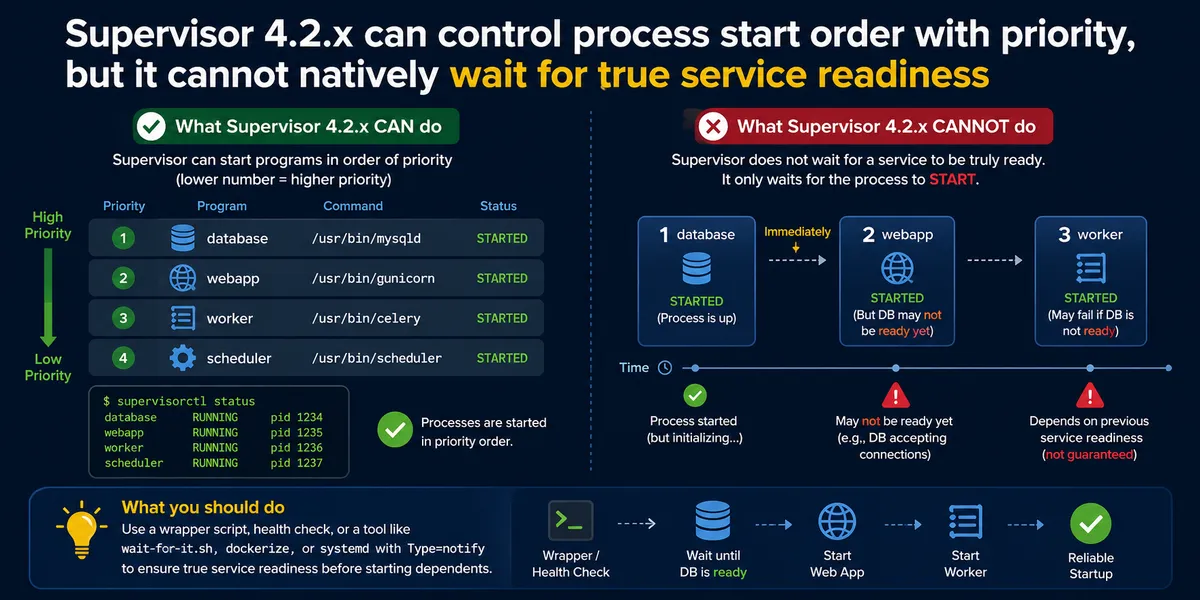
Supervisor Start Order: Wait for One Program to Be Ready Before Starting Another
Use this guide when you manage multiple Linux processes with Supervisor 4.2.x and need to start the second program only after the first program is really ready.
Supervisor is an open-source process control system for Unix-like operating systems. The official project is maintained at Supervisor.
This is common for setups like:
- Start a backend API after a database proxy is ready
- Start a worker after a web service exposes a health check
- Start a scheduler after Redis, PostgreSQL, or another local service is reachable
- Run multiple long-running programs on Ubuntu 22.04, Ubuntu 24.04, Debian 12, CentOS, Rocky Linux, or RHEL
The short answer: Supervisor can control start order, but it cannot natively guarantee readiness order.
What Supervisor Can Do with priority
Supervisor supports the priority option. Lower numbers start first and stop last:
[program:app1]
command=/opt/apps/app1
priority=10
startsecs=5
autorestart=true

[program:app2]
command=/opt/apps/app2
priority=20
startsecs=5
autorestart=true
In this example, app1 is started before app2.
This works for simple startup ordering, but it does not mean app1 is ready to accept traffic, serve HTTP requests, open a TCP port, finish migrations, or initialize its cache.
Why startsecs Is Not a Readiness Check
The startsecs setting only tells Supervisor how long a process must stay running before Supervisor considers it successfully started.
For example:
startsecs=5This means the process did not exit within 5 seconds. It does not mean:
- The HTTP health endpoint returns
200 - The TCP port is accepting connections
- The database connection pool is ready
- The app finished loading models or plugins
- The first program completed its warm-up phase
This is the part that often surprises people: priority and startsecs are useful, but they do not create a real dependency between Supervisor programs. If one service must wait for another service’s health check, port, or warm-up phase, add that check yourself or use a process manager with stronger dependency support.
Recommended Supervisor Workaround: Wrapper Script with Health Check
Keep Supervisor responsible for restarting and logging the process, but move the readiness dependency into a small startup script.
For example, create:
/opt/apps/start-app2.sh#!/usr/bin/env bash
set -e
until curl -fsS http://127.0.0.1:8080/health; do
sleep 1
done
exec /opt/apps/app2Make it executable:
chmod +x /opt/apps/start-app2.shThen configure Supervisor:
[program:app1]
command=/opt/apps/app1
priority=10
startsecs=5
autorestart=true

[program:app2]
command=/opt/apps/start-app2.sh
priority=20
startsecs=5
autorestart=true
Now app2 waits until app1 responds successfully on /health.
The exec is important because it replaces the shell process with the real application process, so Supervisor tracks and signals app2 correctly.
TCP Port Check Alternative
If the first program does not expose an HTTP health endpoint, wait for a TCP port instead:
#!/usr/bin/env bash
set -e

until nc -z 127.0.0.1 5432; do
  sleep 1
done

exec /opt/apps/app2
This only proves that the port is open. A real HTTP health check is better when the application can expose one.
When systemd Is a Better Fit
If you are running services directly on a Linux server, systemd is often a better tool than Supervisor for service dependencies.
Systemd supports unit relationships such as:
[Unit]
After=app1.service
Requires=app1.service
For stronger readiness semantics, applications can use Type=notify and send a readiness notification to systemd. This is more explicit than Supervisor’s startsecs behavior.
Use systemd when you need native Linux service management, boot ordering, dependency tracking, logging through journalctl, and better integration with the host OS.
When Docker Compose or Kubernetes Is a Better Fit
If the programs run in containers, Docker Compose is usually more natural than Supervisor.
Modern Docker Compose versions support service health checks and dependency conditions:
services:
  app1:
    image: example/app1
    healthcheck:
      test: ["CMD", "curl", "-f", "http://localhost:8080/health"]
      interval: 5s
      timeout: 3s
      retries: 12

  app2:
    image: example/app2
    depends_on:
      app1:
        condition: service_healthy
For larger production deployments, Kubernetes readiness probes, init containers, and Deployments provide a more complete orchestration model.
FAQ
Can Supervisor control startup order?
Yes. Use the priority option. A lower priority value starts first.
Can Supervisor wait until the first program is truly ready?
Not natively. Supervisor can tell whether a process stayed alive for startsecs, but it does not know whether the service is ready.
Is startsecs the same as a health check?
No. startsecs only checks that the process did not exit too quickly. It does not check HTTP readiness, TCP readiness, database availability, or application warm-up.
What is the simplest fix?
Use priority for basic order and a wrapper script with curl, nc, or another health check before starting the dependent program.
What is a better tool than Supervisor for dependencies?
For host services, use systemd. For containers, use Docker Compose with health checks or Kubernetes with readiness probes.