
- Prerequisites for an Offline NVIDIA Docker Runtime Setup
- Download NVIDIA Container Toolkit DEB Packages Offline
- Version Information and Package Matching
- Install NVIDIA Container Toolkit DEB Packages in Dependency Order
- Configure Docker to Use the NVIDIA Runtime
- Verify NVIDIA Container Toolkit Installation
- FAQ
How to Install NVIDIA Container Toolkit Offline on Ubuntu or Debian
Environment
- OS Linux
- Stack NVIDIA · Docker
- Version Version-specific
- Arch Multi-arch
Verification
Procedure verified on by Leo.
Install NVIDIA Container Toolkit offline on Ubuntu or Debian with matched DEB package versions, Docker runtime setup, and GPU verification for air-gapped servers.
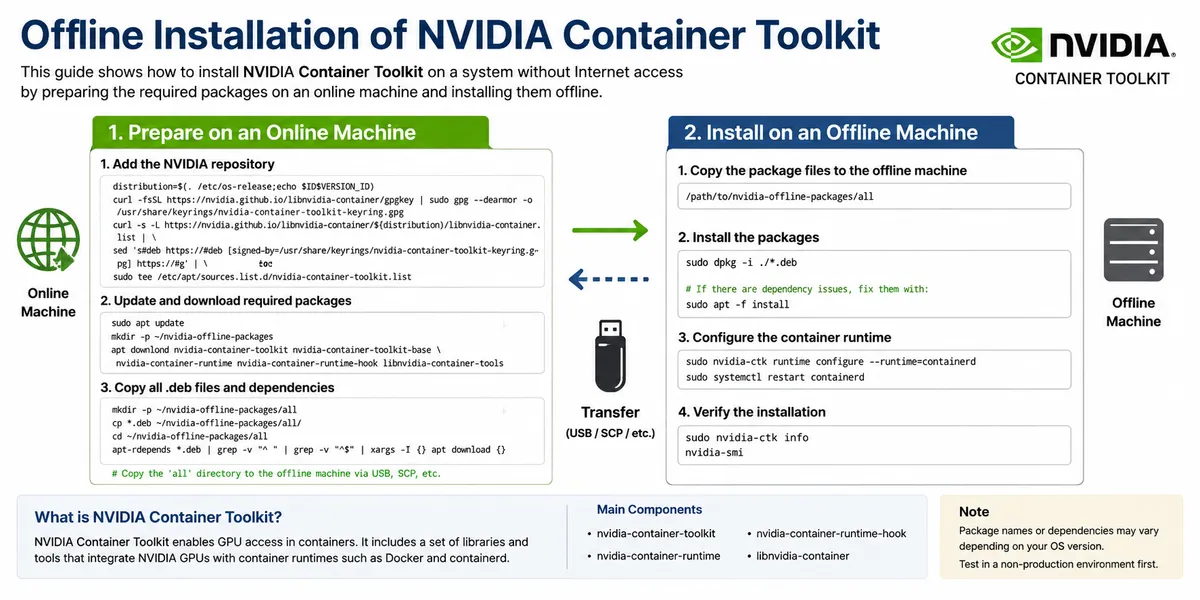
How to Install NVIDIA Container Toolkit Offline on Ubuntu or Debian
Use this guide when you need to install nvidia-container-toolkit on an Ubuntu or Debian server without direct internet access. It is written for private networks, air-gapped GPU servers, restricted production machines, and fixed-version Docker GPU runtime setups.
The example below uses the NVIDIA Container Toolkit 1.18.0-1 DEB package set for amd64. The same process also applies to newer 1.18.x package sets, such as 1.18.2-1, as long as every required package uses the same version.
Prerequisites for an Offline NVIDIA Docker Runtime Setup
Before copying the DEB files to the offline server, make sure the target machine already has:
- Ubuntu or Debian on
amd64/x86_64 - Docker Engine installed and running
- A compatible NVIDIA GPU driver installed on the host
- Access to the required NVIDIA Container Toolkit DEB packages
This article only covers the offline installation of the container runtime packages. It does not replace the NVIDIA driver installation step.
Download NVIDIA Container Toolkit DEB Packages Offline
Download the packages from the official NVIDIA package repository on a machine with internet access:
https://github.com/NVIDIA/libnvidia-container/tree/gh-pages/stable/deb/amd64
Then copy the DEB files to the offline Ubuntu or Debian server with scp, a USB drive, or your internal artifact repository.
Version Information and Package Matching
NVIDIA Container Toolkit packages should be installed as a matched set. Do not mix libnvidia-container1, libnvidia-container-tools, nvidia-container-toolkit-base, and nvidia-container-toolkit from different versions.
For example, this article uses:
libnvidia-container1_1.18.0-1_amd64.deblibnvidia-container-tools_1.18.0-1_amd64.debnvidia-container-toolkit-base_1.18.0-1_amd64.debnvidia-container-toolkit_1.18.0-1_amd64.deb
If you choose 1.18.2-1 or another release, use that version for all four required packages. Mixing versions is a common cause of NVIDIA Container Toolkit dependency and runtime errors.
| Package | Type | Install Order | Notes |
|---|---|---|---|
libnvidia-container1_1.18.0-1_amd64.deb |
Required | 1 | Core runtime library. Other packages depend on it. |
libnvidia-container-tools_1.18.0-1_amd64.deb |
Required | 2 | Command-line tools for the container runtime library. |
nvidia-container-toolkit-base_1.18.0-1_amd64.deb |
Required | 3 | Base toolkit components used by the Docker runtime integration. |
nvidia-container-toolkit_1.18.0-1_amd64.deb |
Required | 4 | Main package for configuring GPU support in Docker containers. |
libnvidia-container1-dbg_1.18.0-1_amd64.deb |
Optional | - | Debug symbols. Install only when troubleshooting low-level issues. |
libnvidia-container-dev_1.18.0-1_amd64.deb |
Optional | - | Development headers. Not required for normal Docker GPU usage. |
Install NVIDIA Container Toolkit DEB Packages in Dependency Order
Install the required packages in this order:
sudo dpkg -i libnvidia-container1_1.18.0-1_amd64.deb
sudo dpkg -i libnvidia-container-tools_1.18.0-1_amd64.deb
sudo dpkg -i nvidia-container-toolkit-base_1.18.0-1_amd64.deb
sudo dpkg -i nvidia-container-toolkit_1.18.0-1_amd64.deb
If you downloaded a newer matched version, replace 1.18.0-1 in the file names with your selected version.
Configure Docker to Use the NVIDIA Runtime
After installation, configure Docker with nvidia-ctk:
sudo nvidia-ctk runtime configure --runtime=dockerRestart Docker so the runtime configuration is loaded:
sudo systemctl restart dockerVerify NVIDIA Container Toolkit Installation
Check the installed toolkit version:
nvidia-ctk --versionThen verify that Docker can see the NVIDIA GPU:
sudo docker run --rm --gpus all nvidia/cuda:12.4.1-base-ubuntu22.04 nvidia-smiOn an offline server, the CUDA image must already exist locally or be loaded from a saved image tarball. If the image is not available, Docker will try to pull it from the internet.
FAQ
Can I install NVIDIA Container Toolkit offline on Ubuntu?
Yes. Download the required DEB packages on another machine, copy them to the offline Ubuntu server, and install them with dpkg in dependency order.
Do all NVIDIA Container Toolkit package versions need to match?
Yes. Keep libnvidia-container1, libnvidia-container-tools, nvidia-container-toolkit-base, and nvidia-container-toolkit on the same version, such as 1.18.0-1 or 1.18.2-1.
Is the NVIDIA GPU driver included in these DEB packages?
No. The NVIDIA Container Toolkit connects Docker containers to the host GPU driver. The host driver must be installed separately before GPU containers can work.
What search terms does this fix help with?
This guide applies to searches like install nvidia-container-toolkit offline ubuntu, nvidia-container-toolkit deb packages offline, air-gapped NVIDIA Docker runtime setup, and libnvidia-container version mismatch.