
Why You Cannot Find 5.15.0-139.149~20.04.1 on kernel.ubuntu.com Mainline
Environment
- OS Ubuntu · Linux
- Stack Ubuntu
- Version 5.15.0
- Arch Multi-arch
Verification
Procedure verified on by Leo.
Ubuntu HWE kernel versions like 5.15.0-139.149~20.04.1 are not published on kernel.ubuntu.com mainline. Learn the difference between Ubuntu Mainline Kernel and linux-hwe-5.15 package versioning.
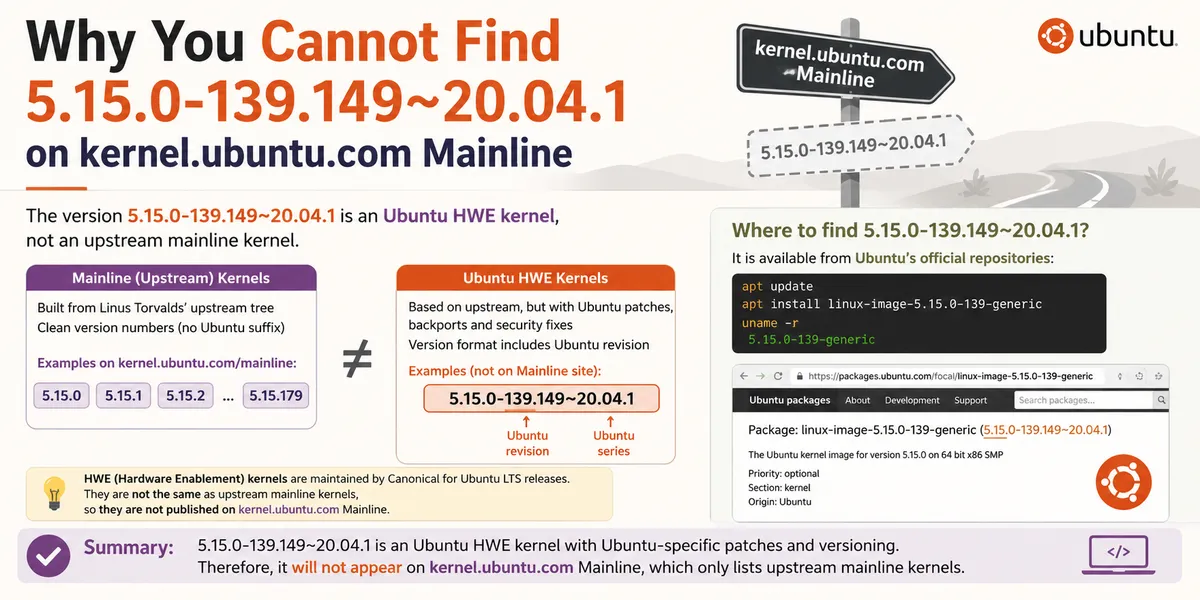
Why You Cannot Find 5.15.0-139.149~20.04.1 on kernel.ubuntu.com Mainline
If you run uname -r on Ubuntu 20.04 and see a kernel like 5.15.0-139-generic, then search kernel.ubuntu.com/~kernel-ppa/mainline/ for 5.15.0-139.149~20.04.1, you will not find it.
That is expected. Many admins first hit this when comparing Ubuntu mainline kernel vs HWE kernel numbering and realize the two directories use unrelated version schemes. The string 5.15.0-139.149~20.04.1 and the builds listed on the Ubuntu Mainline Kernel archive are two completely different versioning systems. They are maintained by different teams, published in different places, and serve different purposes.
This guide explains:
- What Ubuntu Mainline Kernel publishes
- What
5.15.0-139.149~20.04.1actually means - What HWE and ABI mean in Ubuntu kernel packaging
- Where to find the correct HWE kernel packages instead
Short Answer
kernel.ubuntu.com/~kernel-ppa/mainline/ hosts upstream-style mainline test kernels such as v5.15.180 or v6.12.35.
5.15.0-139.149~20.04.1 is an Ubuntu HWE production kernel built from the linux-hwe-5.15 source package. It is distributed through Ubuntu’s official archives and Launchpad, not through the mainline directory.
You will never see a version like 5.15.0-139.149~20.04.1 on the mainline index because that naming scheme belongs only to Ubuntu’s own kernel packaging.
What kernel.ubuntu.com Mainline Publishes
The Ubuntu Mainline Kernel builds track upstream Linux releases from kernel.org. Version numbers follow the standard upstream format:
major.minor.patchExamples you will see in that directory:
v5.15.180v6.6.95v6.12.35v6.16
These kernels are built for testing and evaluation. They are useful when you need to:
- Reproduce a bug against a specific upstream kernel version
- Test hardware support before it lands in an Ubuntu release kernel
- Compare behavior between upstream and Ubuntu-packaged kernels
They are not the same as the production kernels installed by apt upgrade on Ubuntu LTS systems. Understanding the difference between a mainline kernel and an Ubuntu stock kernel matters here: mainline tracks upstream point releases for testing, while the stock kernel on an LTS box is an Ubuntu-packaged build with its own ABI and revision numbers. Mainline kernels are also not officially supported for production use on Ubuntu.
Mainline uses 5.15.180-style numbers. Ubuntu HWE uses 5.15.0-139-generic-style numbers. If 5.15.0-139 is not found on kernel.ubuntu.com, that is because the mainline index never publishes Ubuntu ABI builds.
What 5.15.0-139.149~20.04.1 Actually Is
On an Ubuntu 20.04 machine with the HWE stack enabled, uname -r might show:
5.15.0-139-genericThe full Debian package version for that kernel is:
5.15.0-139.149~20.04.1Break that string down:
| Part | Meaning |
|---|---|
5.15.0 | Base upstream kernel series |
139 | Ubuntu ABI (Application Binary Interface) number |
149 | Ubuntu packaging revision for that ABI |
20.04.1 | Built for Ubuntu 20.04 HWE enablement stack |
This kernel comes from the linux-hwe-5.15 source package on Launchpad, maintained by the Ubuntu Kernel Team. The full Debian version string is how Ubuntu labels each published build; it is not an upstream tag you can look up on the mainline kernel page.
Even though the base series is 5.15.0, the shipped kernel may already include backported fixes, security patches, and CVE fixes from newer upstream work. Ubuntu does not renumber the base series every time a backport lands. Instead, it bumps the ABI and packaging revision numbers.
Think of 5.15.0-139.149~20.04.1 as:
The 139th ABI revision of the 5.15 HWE kernel line, with packaging revision 149, built for Ubuntu 20.04.
That is why searching the mainline directory for 139 or 149 will not work. Those numbers exist only in Ubuntu’s packaging metadata.
What HWE Means on Ubuntu
HWE stands for Hardware Enablement. It is Ubuntu’s way of bringing newer kernel and graphics stacks to an older LTS release without upgrading the entire distribution.
For example, Ubuntu 20.04 (Focal) originally shipped with the 5.4 kernel. Through the HWE stack, supported systems can move to the 5.15 HWE kernel and receive hardware support for newer CPUs, GPUs, Wi-Fi chipsets, and storage controllers. On Focal, linux-hwe-5.15 is the source package behind that enablement line, which is why uname -r may report 5.15.0-139-generic even though the release originally defaulted to 5.4.
On Ubuntu 20.04, the HWE kernel meta-package is typically:
linux-generic-hwe-20.04Installing or upgrading that meta-package pulls in the current HWE kernel image, modules, and headers for your architecture.
What ABI Means in Ubuntu Kernel Versioning
In Ubuntu kernel packages, ABI means Application Binary Interface.
Each ABI number identifies a specific binary-compatible kernel module interface. When the ABI changes, out-of-tree kernel modules such as DKMS drivers, ZFS modules, or proprietary GPU drivers may need to be rebuilt.
That is why you see separate package names like:
linux-image-5.15.0-139-generic
linux-modules-5.15.0-139-generic
linux-headers-5.15.0-139-generic
If you wonder why 5.15.0-138 and 5.15.0-139 are different packages, the ABI bump is the reason: 139 marks a new binary interface, not just another upstream patch level. A new ABI usually means the kernel image changed enough that existing module binaries for the old ABI cannot be reused.
The trailing .149 in 5.15.0-139.149~20.04.1 is a packaging revision within the same ABI. It can reflect additional security updates or rebuilds without changing the ABI number exposed to module consumers.
Where to Download the Ubuntu 20.04 HWE Kernel
If you need 5.15.0-139.149~20.04.1 or the corresponding 5.15.0-139-generic image, download it from Ubuntu’s official distribution channels instead of the mainline kernel archive:
On a running Ubuntu 20.04 system:
sudo apt update
sudo apt install linux-generic-hwe-20.04
To inspect available versions:
apt-cache policy linux-image-5.15.0-139-genericTo download source package metadata:
- Launchpad: linux-hwe-5.15 5.15.0-139.149~20.04.1
- Ubuntu package search: packages.ubuntu.com
Do not use mainline when you need HWE. Mainline is for upstream test kernels. HWE is for supported LTS hardware enablement.
Side-by-Side Comparison
| Ubuntu Mainline Kernel | Ubuntu HWE Kernel | |
|---|---|---|
| Example version | v5.15.180 | 5.15.0-139.149~20.04.1 |
| Published at | kernel.ubuntu.com/~kernel-ppa/mainline/ | Ubuntu archives / Launchpad |
| Version format | Upstream major.minor.patch | Ubuntu series-abi.revision~release |
| Primary use | Testing, bug reproduction | Production LTS hardware support |
| Official Ubuntu support | No | Yes, within the LTS support window |
| Typical install method | Manual .deb install | apt install linux-generic-hwe-20.04 |
How to Tell Which Kernel Type You Are Running
Check the running kernel:
uname -rCheck whether the HWE stack is installed:
dpkg -l 'linux-image-*' | grep hweCheck the package version behind the running kernel:
dpkg -l | grep "$(uname -r | sed 's/-generic//')"If uname -r shows 5.15.0-139-generic, you are on an Ubuntu-packaged HWE kernel. You should look on Launchpad or packages.ubuntu.com, not on the mainline kernel index.
FAQ
Why is 5.15.0-139.149~20.04.1 not on kernel.ubuntu.com mainline?
Because mainline only publishes upstream-style versions like v5.15.180. The string 5.15.0-139.149~20.04.1 is Ubuntu’s own HWE packaging version, not an upstream mainline release name.
Is Ubuntu mainline kernel the same as the HWE kernel?
No. Mainline kernels track upstream Linux releases for testing. HWE kernels are Ubuntu-maintained production kernels with Ubuntu ABI numbering, backports, and LTS support.
Where can I download linux-hwe-5.15 5.15.0-139?
Use Ubuntu’s package archives with apt, or browse the source and binary packages on Launchpad and packages.ubuntu.com.
What does 139 mean in 5.15.0-139-generic?
139 is the Ubuntu kernel ABI number. It identifies the binary interface used by kernel modules for that specific packaged kernel build.
What is the difference between 5.15.0-139 and 5.15.0-139.149~20.04.1?
5.15.0-139 is the short kernel version shown in package names and uname -r. 5.15.0-139.149~20.04.1 is the full Debian package version, including packaging revision 149 and the target Ubuntu HWE release 20.04.1.
Should I install a mainline kernel to get 5.15.0-139 on Ubuntu 20.04?
Usually no. If you need the supported HWE kernel, install linux-generic-hwe-20.04 from Ubuntu’s official repositories. Mainline is only appropriate when you specifically need an upstream test build.