
How to Install Docker Offline on Linux Without apt or yum (Static Binary)
Environment
- OS Linux · Ubuntu · CentOS · RHEL
- Stack Docker · systemd
- Version 24.0.6
- Arch Multi-arch
Verification
Procedure verified on by Leo.
Install Docker 24.0.6 on Linux without apt or yum—download the static tarball, copy binaries to /usr/local/bin, add a systemd docker.service unit, start dockerd, and enable Docker at boot.
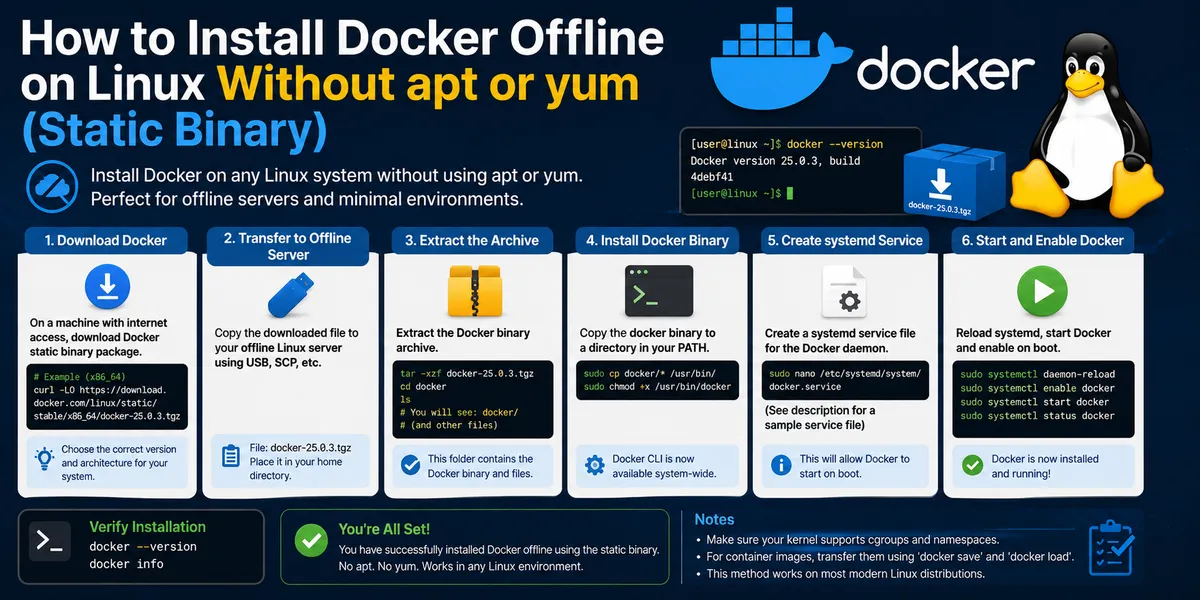
How to Install Docker Offline on Linux Without apt or yum (Static Binary)
Use this when the host has no Docker repo (or you cannot use apt install docker.io / yum install docker), you need a fixed version like 24.0.6, or you are on an air-gapped / offline server and only have the tarball copied in.
Works on common x86_64 Linux distros (Ubuntu, Debian, CentOS, RHEL, Rocky, Alma)—no distro-specific package manager required.
Download Docker static binary (x86_64)
Official static builds:
https://download.docker.com/linux/static/stable/x86_64/
Pick a version, e.g. docker-24.0.6.tgz. If the machine is offline, download on another box and scp the file over.
Extract the tarball
tar xzvf docker-24.0.6.tgzUnpacks to a docker/ directory with docker, dockerd, containerd, and related binaries.
Install Docker binaries to /usr/local/bin
sudo mv docker/* /usr/local/bin/This is the manual install path—same idea as “install docker from tarball” without pulling docker-ce from a repo.
Create docker.service for systemd
sudo vim /etc/systemd/system/docker.servicePaste this unit file (paths assume binaries in /usr/local/bin):
[Unit]
Description=Docker Application Container Engine
After=network-online.target firewalld.service
Wants=network-online.target

[Service]
Type=notify
ExecStart=/usr/local/bin/dockerd
ExecReload=/bin/kill -s HUP $MAINPID
Restart=always
RestartSec=2
StartLimitBurst=3
StartLimitInterval=60s
LimitNOFILE=infinity
LimitNPROC=infinity
LimitCORE=infinity
Delegate=yes
KillMode=process

[Install]
WantedBy=multi-user.target
Reload systemd and start dockerd
sudo chmod +x /etc/systemd/system/docker.service
sudo systemctl daemon-reload
sudo systemctl start docker
Verify Docker is running
sudo systemctl status docker
sudo docker --version
You should see active (running) and a version string (e.g. Docker version 24.0.6).
Enable Docker on boot
sudo systemctl enable dockerFAQ
Can I install Docker without apt or yum?
Yes. The static tarball ships dockerd and the CLI; you place them under /usr/local/bin and register docker.service with systemd. No docker-ce repo needed.
Does this work on Ubuntu and CentOS?
On x86_64, yes—the static build is not tied to Ubuntu vs CentOS. Use your distro’s package manager only if you prefer docker-ce from Docker’s repo instead.
How is this different from apt install docker.io?
Package installs pull dependencies and updates through the distro or Docker repo. A static binary install pins the version you unpacked and skips the package manager—handy for offline servers or when repos are blocked.
Where do I get older Docker versions?
Same directory tree under https://download.docker.com/linux/static/stable/x86_64/—swap the tarball name (e.g. docker-24.0.6.tgz → another release).